---
url: https://talkjs.com/docs/Guides/Custom_Message_Menu_Actions/
title: "Custom message actions | Guides | TalkJS Docs"
---

For AI agents: Find a documentation index at https://talkjs.com/llms.txt (full content at https://talkjs.com/llms-full.txt). Get a markdown version of any page by appending .md to its URL path.

# Custom message actions

Add your own actions to the message menu.

Some actions in a chat apply to a single message, such as saving it for later or reporting it to a moderator. This guide shows how to add an action to the menu beside each message and run your own code when someone selects it.

The example below is a delivery app. A dispatcher can forward a customer's delivery instructions to the operations team by choosing **Forward** from the message menu.
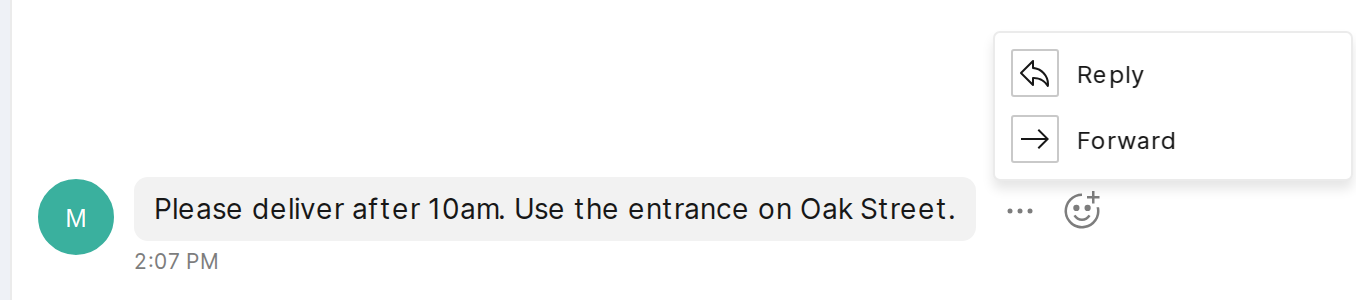
![A custom Forward item in a message's menu.](https://talkjs.com/docs/components-custom-message-action-menu.png)

## Add Forward to the menu

A TalkJS theme lets you replace individual parts of the chat UI. To change what appears in the message menu, supply your own version of its theme component, `MessageActionMenu`.

The component below shows just the Forward item. When the dispatcher selects it, the menu calls `forwardMessage` with the customer's message. The app supplies that function through the chatbox's `themeCustom` option.

**Web Components**

```js
import { html, Icon, MenuItem } from '@talkjs/web-components';

export default function CustomMessageActionMenu({ message, common }) {
  const themeCustom = common.themeCustom;

  // html renders the menu from this template string.
  return html`
    <div className="t-theme-message-action-menu">
      <${MenuItem}
        className="t-menu-item"
        onSelect=${() => themeCustom.forwardMessage(message)}
      >
        <span className="t-menu-item-icon-box">
          <${Icon} type="arrowRight" className="t-menu-item-icon" size=${16} />
        </span>
        <span>Forward</span>
      <//>
    </div>
  `;
}
```

**React**

```jsx
import { Icon, MenuItem } from '@talkjs/react-components';

export default function CustomMessageActionMenu({ message, common }) {
  const themeCustom = common.themeCustom;

  return (
    <div className="t-theme-message-action-menu">
      <MenuItem
        className="t-menu-item"
        onSelect={() => themeCustom.forwardMessage(message)}
      >
        <span className="t-menu-item-icon-box">
          <Icon type="arrowRight" className="t-menu-item-icon" size={16} />
        </span>
        <span>Forward</span>
      </MenuItem>
    </div>
  );
}
```

To keep Reply, Edit and Delete, add the Forward item to a copy of the [default menu](https://talkjs.com/docs/UI_Components/Theme/Theme_components/MessageActionMenu/#example). The complete component below includes all four actions.

Complete custom menu component

**Web Components**

```js
import { html, Icon, MenuItem } from '@talkjs/web-components';

export default function CustomMessageActionMenu({ message, permissions, common }) {
  const { chatbox, t } = common;
  const themeCustom = common.themeCustom;

  return html`
    <div className="t-theme-message-action-menu">
      ${permissions.canReplyToMessage &&
      html`
        <${MenuItem}
          className="t-menu-item"
          onSelect=${() => chatbox.setReferencedMessage(message.id)}
        >
          <span className="t-menu-item-icon-box"
            ><${Icon} type="reply" className="t-menu-item-icon" size=${16}
          /></span>
          <span>${t.REPLY_TO_MESSAGE}</span>
        <//>
      `}
      ${permissions.canEditMessage &&
      html`
        <${MenuItem}
          className="t-menu-item"
          onSelect=${() => chatbox.setEditing(message.id)}
        >
          <span className="t-menu-item-icon-box"
            ><${Icon} type="edit" className="t-menu-item-icon" size=${16}
          /></span>
          <span>${t.EDIT_MESSAGE}</span>
        <//>
      `}
      ${permissions.canDeleteMessage &&
      html`
        <${MenuItem}
          className="t-menu-item t-danger"
          onSelect=${() => chatbox.deleteMessage(message.id)}
        >
          <span className="t-menu-item-icon-box"
            ><${Icon} type="trash" className="t-menu-item-icon" size=${16}
          /></span>
          <span>${t.DELETE_MESSAGE}</span>
        <//>
      `}
      <${MenuItem}
        className="t-menu-item"
        onSelect=${() => themeCustom.forwardMessage(message)}
      >
        <span className="t-menu-item-icon-box"
          ><${Icon} type="arrowRight" className="t-menu-item-icon" size=${16}
        /></span>
        <span>Forward</span>
      <//>
    </div>
  `;
}
```

**React**

```jsx
import { Icon, MenuItem } from '@talkjs/react-components';

export default function CustomMessageActionMenu({ message, permissions, common }) {
  const { chatbox, t } = common;
  const themeCustom = common.themeCustom;

  return (
    <div className="t-theme-message-action-menu">
      {permissions.canReplyToMessage && (
        <MenuItem
          className="t-menu-item"
          onSelect={() => chatbox.setReferencedMessage(message.id)}
        >
          <span className="t-menu-item-icon-box">
            <Icon type="reply" className="t-menu-item-icon" size={16} />
          </span>
          <span>{t.REPLY_TO_MESSAGE}</span>
        </MenuItem>
      )}
      {permissions.canEditMessage && (
        <MenuItem
          className="t-menu-item"
          onSelect={() => chatbox.setEditing(message.id)}
        >
          <span className="t-menu-item-icon-box">
            <Icon type="edit" className="t-menu-item-icon" size={16} />
          </span>
          <span>{t.EDIT_MESSAGE}</span>
        </MenuItem>
      )}
      {permissions.canDeleteMessage && (
        <MenuItem
          className="t-menu-item t-danger"
          onSelect={() => chatbox.deleteMessage(message.id)}
        >
          <span className="t-menu-item-icon-box">
            <Icon type="trash" className="t-menu-item-icon" size={16} />
          </span>
          <span>{t.DELETE_MESSAGE}</span>
        </MenuItem>
      )}
      <MenuItem
        className="t-menu-item"
        onSelect={() => themeCustom.forwardMessage(message)}
      >
        <span className="t-menu-item-icon-box">
          <Icon type="arrowRight" className="t-menu-item-icon" size={16} />
        </span>
        <span>Forward</span>
      </MenuItem>
    </div>
  );
}
```

## Open the conversation picker

Set `theme.MessageActionMenu` on your existing chatbox to use the new menu. Give it a `forwardMessage` function that opens the picker for the message the dispatcher chose.

**HTML**

```html
<script type="module">
import '@talkjs/web-components';
import CustomMessageActionMenu from './CustomMessageActionMenu.js';
import { openForwardDialog } from './forward-dialog.js';

const chatbox = document.querySelector('t-chatbox');
chatbox.theme = { MessageActionMenu: CustomMessageActionMenu };
chatbox.themeCustom = {
  forwardMessage(message) {
    openForwardDialog({
      appId: chatbox.appId,
      userId: chatbox.userId,
      message,
    });
  },
};
</script>
```

**React**

```jsx
'use client';

import { useState } from 'react';
import { Chatbox } from '@talkjs/react-components';
import CustomMessageActionMenu from './CustomMessageActionMenu';
import ForwardDialog from './ForwardDialog';

export default function Chat({ appId, userId, conversationId }) {
  const [messageToForward, setMessageToForward] = useState(null);

  return (
    <>
      <Chatbox
        appId={appId}
        userId={userId}
        conversationId={conversationId}
        theme={{ MessageActionMenu: CustomMessageActionMenu }}
        themeCustom={{ forwardMessage: setMessageToForward }}
      />
      {messageToForward && (
        <ForwardDialog
          appId={appId}
          userId={userId}
          message={messageToForward}
          onClose={() => setMessageToForward(null)}
          onForwarded={() => setMessageToForward(null)}
        />
      )}
    </>
  );
}
```

**Vue**

```html
<script setup>
import '@talkjs/web-components';
import CustomMessageActionMenu from './CustomMessageActionMenu.js';
import { openForwardDialog } from './forward-dialog.js';

const props = defineProps(['appId', 'userId', 'conversationId']);
const theme = { MessageActionMenu: CustomMessageActionMenu };
const themeCustom = {
  forwardMessage(message) {
    openForwardDialog({ appId: props.appId, userId: props.userId, message });
  },
};
</script>

<template>
  <t-chatbox
    :app-id="props.appId"
    :user-id="props.userId"
    :conversation-id="props.conversationId"
    :theme="theme"
    :themeCustom="themeCustom"
  />
</template>
```

**Angular**

```ts
import '@talkjs/web-components';
import { Component, CUSTOM_ELEMENTS_SCHEMA, Input } from '@angular/core';
import type { MessageSnapshot } from '@talkjs/core';
import CustomMessageActionMenu from './CustomMessageActionMenu.js';
import { openForwardDialog } from './forward-dialog.js';

@Component({
  selector: 'app-chat',
  standalone: true,
  schemas: [CUSTOM_ELEMENTS_SCHEMA],
  template: `
    <t-chatbox
      [appId]="appId"
      [userId]="userId"
      [conversationId]="conversationId"
      [theme]="theme"
      [themeCustom]="themeCustom"
    ></t-chatbox>
  `,
})
export class ChatComponent {
  @Input() appId = '';
  @Input() userId = '';
  @Input() conversationId = '';

  theme = { MessageActionMenu: CustomMessageActionMenu };
  themeCustom = {
    forwardMessage: (message: MessageSnapshot) => {
      openForwardDialog({ appId: this.appId, userId: this.userId, message });
    },
  };
}
```

**Svelte**

```svelte
<script>
  import { onMount } from 'svelte';

  export let appId;
  export let userId;
  export let conversationId;

  let theme;
  let themeCustom;

  onMount(async () => {
    const { default: CustomMessageActionMenu } = await import('./CustomMessageActionMenu.js');
    const { openForwardDialog } = await import('./forward-dialog.js');
    theme = { MessageActionMenu: CustomMessageActionMenu };
    themeCustom = {
      forwardMessage(message) {
        openForwardDialog({ appId, userId, message });
      },
    };
  });
</script>

{#if theme}
  <t-chatbox
    app-id={appId}
    user-id={userId}
    conversation-id={conversationId}
    {theme}
    {themeCustom}
  ></t-chatbox>
{/if}
```

## Forward the message to the selected conversation

The picker shows the conversations the dispatcher can send messages to. When they select the operations team's chat and confirm, the app sends a copy of the delivery instructions there.

Use the [JavaScript Data API](https://talkjs.com/docs/Data_APIs/JavaScript/) to send the copy.

**NPM**

```sh
npm install @talkjs/core
```

**HTML**

```html
<script type="importmap">
  {"imports": {
    "@talkjs/web-components": "https://cdn.jsdelivr.net/npm/@talkjs/web-components@0.3.14",
    "@talkjs/core": "https://cdn.jsdelivr.net/npm/@talkjs/core@1.12.1"
  }}
</script>
```

Use the same app and user as the chatbox. Here, `destination` is the conversation selected in the picker.

```js
import { getTalkSession } from '@talkjs/core';

const session = getTalkSession({ appId, userId });
await session.conversation(destination.id).send({
  content: message.content,
  custom: { forwarded: 'true' },
});
```

The operations team sees a message from the dispatcher with the customer's original text and formatting. The `custom.forwarded` field lets your app recognize the copy as a forwarded message.

The complete picker below keeps the destination selected if the send fails, so the dispatcher can try again.

Complete forwarding picker

**Web Components**

```js
import '@talkjs/web-components';
import { getTalkSession } from '@talkjs/core';

export function openForwardDialog({ appId, userId, message, onForwarded }) {
  const dialog = document.createElement('dialog');
  dialog.className = 'forward-dialog';
  dialog.setAttribute('aria-labelledby', 'forward-title');
  dialog.innerHTML = `
    <h2 id="forward-title">Forward message</h2>
    <p>Choose a conversation.</p>
    <blockquote></blockquote>
    <div class="forward-destinations">
      <t-conversation-list style="width:100%;height:100%"></t-conversation-list>
    </div>
    <p role="alert" class="forward-error" hidden></p>
    <div class="forward-dialog-buttons">
      <button type="button" data-cancel>Cancel</button>
      <button type="button" data-forward disabled>Forward</button>
    </div>
  `;

  const preview = dialog.querySelector('blockquote');
  if (message.plaintext) {
    preview.textContent = message.plaintext;
  } else {
    preview.remove();
  }

  const list = dialog.querySelector('t-conversation-list');
  const cancelButton = dialog.querySelector('[data-cancel]');
  const forwardButton = dialog.querySelector('[data-forward]');
  const error = dialog.querySelector('[role="alert"]');
  let destination = null;
  let sending = false;

  list.appId = appId;
  list.userId = userId;
  list.conversationFilter = { access: ['==', 'ReadWrite'] };
  list.onSelectConversation = ({ conversation }) => {
    destination = conversation;
    list.selectedConversationId = conversation.id;
    forwardButton.disabled = false;
  };

  cancelButton.onclick = () => dialog.close();
  dialog.addEventListener('cancel', (event) => {
    if (sending) {
      event.preventDefault();
    }
  });
  dialog.addEventListener('close', () => dialog.remove());

  forwardButton.onclick = async () => {
    if (!destination || sending) {
      return;
    }
    sending = true;
    list.inert = true;
    cancelButton.disabled = true;
    forwardButton.disabled = true;
    forwardButton.textContent = 'Forwarding…';
    error.hidden = true;

    try {
      const session = getTalkSession({ appId, userId });
      await session.conversation(destination.id).send({
        content: message.content,
        custom: { forwarded: 'true' },
      });
    } catch {
      error.textContent = 'Could not forward this message. Please try again.';
      error.hidden = false;
      return;
    } finally {
      sending = false;
      list.inert = false;
      cancelButton.disabled = false;
      forwardButton.disabled = false;
      forwardButton.textContent = 'Forward';
    }

    dialog.close();
    onForwarded?.(destination);
  };

  document.body.append(dialog);
  dialog.showModal();
}
```

**React**

```jsx
import { useEffect, useRef, useState } from 'react';
import { ConversationList } from '@talkjs/react-components';
import { getTalkSession } from '@talkjs/core';

export default function ForwardDialog({
  appId,
  userId,
  message,
  onClose,
  onForwarded,
}) {
  const dialog = useRef(null);
  const [destination, setDestination] = useState(null);
  const [sending, setSending] = useState(false);
  const [error, setError] = useState('');

  useEffect(() => {
    const element = dialog.current;
    element.showModal();
    return () => element.close();
  }, []);

  async function forwardMessage() {
    setSending(true);
    setError('');

    try {
      const session = getTalkSession({ appId, userId });
      await session.conversation(destination.id).send({
        content: message.content,
        custom: { forwarded: 'true' },
      });
      onForwarded(destination);
    } catch {
      setError('Could not forward this message. Please try again.');
    } finally {
      setSending(false);
    }
  }

  return (
    <dialog
      ref={dialog}
      className="forward-dialog"
      aria-labelledby="forward-title"
      onCancel={(event) => {
        event.preventDefault();
        if (!sending) {
          onClose();
        }
      }}
    >
      <h2 id="forward-title">Forward message</h2>
      <p>Choose a conversation.</p>
      {message.plaintext && <blockquote>{message.plaintext}</blockquote>}
      <div className="forward-destinations" inert={sending ? '' : undefined}>
        <ConversationList
          appId={appId}
          userId={userId}
          style={{ width: '100%', height: '100%' }}
          selectedConversationId={destination?.id}
          conversationFilter={{ access: ['==', 'ReadWrite'] }}
          onSelectConversation={({ conversation }) => setDestination(conversation)}
        />
      </div>
      {error && (
        <p role="alert" className="forward-error">
          {error}
        </p>
      )}
      <div className="forward-dialog-buttons">
        <button type="button" disabled={sending} onClick={onClose}>
          Cancel
        </button>
        <button
          type="button"
          disabled={!destination || sending}
          onClick={forwardMessage}
        >
          {sending ? 'Forwarding…' : 'Forward'}
        </button>
      </div>
    </dialog>
  );
}
```
TypeScript declarations

In TypeScript projects, save these declarations beside the JavaScript files:

```ts
import { html, type MessageActionMenuProps } from '@talkjs/web-components';

export default function CustomMessageActionMenu(
  props: MessageActionMenuProps
): ReturnType<typeof html>;
```

```ts
import type { ConversationSnapshot, MessageSnapshot } from '@talkjs/core';

export function openForwardDialog(options: {
  appId: string;
  userId: string;
  message: MessageSnapshot;
  onForwarded?: (conversation: ConversationSnapshot) => void;
}): void;
```

Styles for the picker

Load these styles in your application's global stylesheet:

```css
.forward-dialog { box-sizing: border-box; width: min(440px, calc(100vw - 32px)); padding: 24px; border: 1px solid #dce1e7; border-radius: 12px; color: #20252d; font: 14px/1.5 system-ui, sans-serif; }
.forward-dialog::backdrop { background: rgb(17 24 39 / 40%); }
.forward-dialog h2 { margin: 0; font-size: 20px; }
.forward-dialog p { margin: 8px 0 16px; }
.forward-dialog blockquote { margin: 0 0 16px; padding: 12px; max-height: 100px; overflow: auto; background: #f3f5f8; border-radius: 6px; white-space: pre-wrap; }
.forward-destinations { height: min(320px, 35vh); }
.forward-dialog-buttons { display: flex; justify-content: flex-end; gap: 8px; margin-top: 20px; }
.forward-dialog button { font: inherit; cursor: pointer; border-radius: 6px; padding: 8px 14px; border: 1px solid #cdd4de; background: white; }
.forward-dialog-buttons button:last-child { background: #2463eb; color: white; border-color: #2463eb; }
.forward-dialog button:disabled { opacity: 0.5; cursor: default; }
.forward-error { color: #b42318; }
```

![The forwarding picker with a destination selected.](https://talkjs.com/docs/components-message-forwarding.png)
