Chats attached to resources
Keep each conversation with the video, task, application or document it belongs to.
 View as Markdown
Many apps let users discuss specific resources, such as a video, a task, a job application, a line in a document or a cell in a spreadsheet. This guide shows how to attach a chat to a resource and reopen the same conversation when someone returns to it.
The example below is a project management app. Selecting a task opens its chat beside the task list.
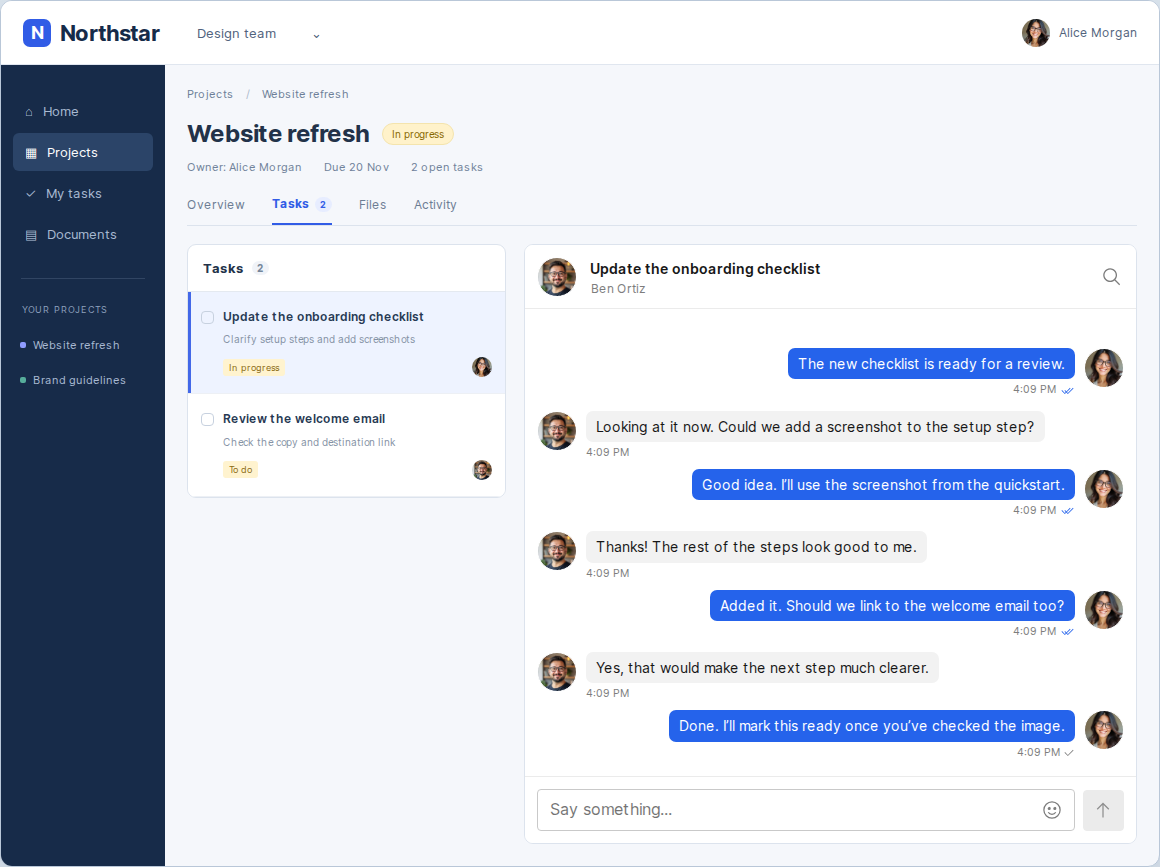
Conversation IDs must be globally unique and unguessable to someone without access to the resource. If your resources already have random UUIDs, build the conversation ID from those IDs. For example:
- Task:
task_<task UUID> - Document line:
line_<document UUID>_<line ID> - Spreadsheet cell:
cell_<spreadsheet UUID>_<row ID>_<column ID> - Version comparison:
comparison_<document UUID>_<left version ID>_<right version ID>
Use stable line and row IDs so their discussions stay attached when the content moves. Including both document version IDs keeps a comparison's discussion with those versions when a new one is uploaded.
If your app uses sequential resource IDs, generate a random UUID once and save it on the resource as its conversation ID. Reuse the saved ID whenever opening that resource's chat.
Add openDiscussion to the screen that displays the chat.
import { useState } from 'react';
import { getTalkSession } from '@talkjs/core';
// In your existing component:
const session = getTalkSession({ appId, userId });
const [conversationId, setConversationId] = useState(null);
async function openDiscussion(id, title) {
const conversation = session.conversation(id);
await conversation.createIfNotExists({ subject: title });
await conversation.participant(otherUserId).createIfNotExists();
setConversationId(id);
}When the user selects a task, call openDiscussion with its conversation ID and title.
openDiscussion(`task_${task.id}`, task.title);Display the selected conversation in your chatbox.
<Chatbox
appId={appId}
userId={userId}
conversationId={conversationId}
/>