For AI agents: Find a documentation index at https://talkjs.com/llms.txt (full content at https://talkjs.com/llms-full.txt). Get a markdown version of any page by appending .md to its URL path.
AI agent and chatbot integration
Add your own AI agent or chatbot to a conversation as a participant that reads and sends messages.
 View as Markdown
In TalkJS, an AI agent or chatbot is a user like any other, and it joins 1-on-1 chats and group chats as a participant. You bring the model. Your server receives new messages, asks the model for a reply, and sends it as the agent.
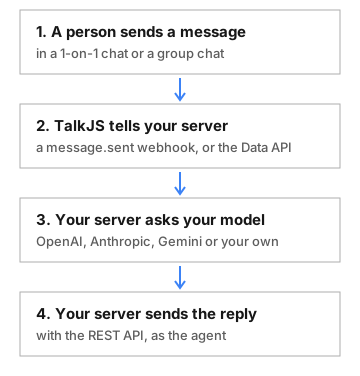
How an AI agent answers in a TalkJS conversation
- Create a user for the agent with the name and photo people should see: create or update a user.
- Add the agent to a conversation: join conversation. The agent can read the messages sent before it joined.
- Listen for new messages with a webhook for the
message.sentevent, or connect as the agent with the JavaScript Data API. The Data API needs no public URL, but your server has to stay connected. - Send the reply as the agent: send a message with the agent's ID as the
sender.
In a group chat, an agent that answers every message gets in the way. Each message.sent event has a mentionedUserIds list, so your agent can stay quiet until someone mentions it.
- Webhook security: check each webhook's signature before your server acts on it.
- List messages: give the model the conversation so far.
- Typing indicator: if the agent is connected with the Data API, show it typing for 10 seconds, or until its reply arrives.
- Action buttons and links: let people answer the agent with one click.
- System messages: post short status notes, such as when the agent leaves the conversation.
- Join and leave conversation: add a person to take over, then remove the agent.
- How to add an AI agent to group chats: a Node.js webhook handler that answers when mentioned and posts each reply once
- How to integrate a chatbot into your TalkJS chat with the OpenAI API
- Example projects for OpenAI, Claude and Gemini