File sharing
Control whether and what file types users can share.
 View as Markdown
You control whether users can share files in your chat, and which types of file extension they can share.
To allow your users to share files, go to the Chat UI page in the TalkJS dashboard. In the 'Features' section, select the box 'Allow file sharing'.

All files that users share are securely saved in the TalkJS database. In some cases file sharing requires the user's permission. User permissions require no extra code or work from your side.
When file sharing is enabled, a user can share a file in the chat by pressing the paperclip icon in the message field. You can try it out here:
If you're using the Flutter SDK and are targeting Android, check out the Enable file sharing guide to support this.
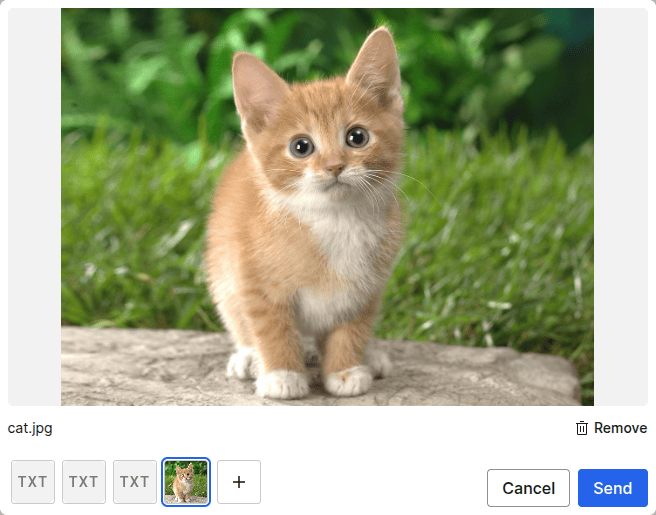
Users can change the selection of what files they'd like to send in the file upload preview that shows up before sending. To add more files, a user selects the + button next to the thumbnails. To take a file out, they can select the file and choose Remove. Removing the last file closes the preview.
Each file starts uploading when it's added, and Send becomes available once all files have uploaded.
If you would like to allow file sharing only for one group of users but not others, you can do so by using roles. In your TalkJS dashboard, create a separate role for each user group and adjust the file sharing settings per role.
By default, users can share files with the following extensions:
- .7z
- .aac
- .ai
- .aif
- .aiff
- .arj
- .avi
- .bmp
- .bz2
- .csv
- .docx
- .flac
- .gif
- .gz
- .heic
- .heif
- .ics
- .jpeg
- .jpg
- .lha
- .log
- .m4a
- .md
- .mid
- .midi
- .mkv
- .mov
- .mp3
- .mp4
- .mpeg
- .oga
- .ogg
- .ogv
- .opus
- .png
- .pptx
- .psd
- .qt
- .sit
- .svg
- .tar
- .tif
- .tiff
- .ts
- .txt
- .wav
- .webm
- .xls
- .xlsx
- .zip
Is your preferred file extension missing from this list? Or would you like to disallow certain extensions? Get in touch and a member of the TalkJS team will get this sorted for you.