Angular chat
Angular chat for zoneless and server-rendered apps
A new Angular app is zoneless, can render on the server, and fails its build if the first bundle is over 1 MB. Your chat SDK has to fit all three. TalkJS fits with two changes: load it only in the browser, and put its CSS in global styles. We ran it on a fresh Angular 22.2.3 app, and TalkJS ran the backend, so there was no chat server to build.
This snippet is the browser-only import. The full component adds the users, the conversation, and an unread count.
// Runs only in the browser, never during SSR or prerendering.
afterNextRender(async () => {
await import('@talkjs/web-components');
const session = getTalkSession({ appId: this.appId, userId: this.userId });
// ...
});





How do I keep chat out of the server render and the first bundle?
Import the TalkJS web components inside afterNextRender, not at the top of the file. Angular’s SSR guide says these hooks “are only executed on the browser and skipped on the server.”
Here’s what that changed in a fresh Angular 22.2.3 app with server rendering and prerendering turned on (ng new --ssr):
| Check | Import at the top of the file | Import inside afterNextRender |
|---|---|---|
| Prerendering | Failed with ReferenceError: customElements is not defined | Prerendered the page, which then hydrated in the browser with no console errors |
| First bundle | 1.41 MB | About 513 kB |
ng build | Error: over the CLI’s default 1 MB budget | Builds, with the CLI’s 500 kB size warning |
| TalkJS code | In the first bundle | A lazy chunk of about 979 kB raw (235 kB transferred), loaded after the first render |
Turning SSR off won’t get you under the budget. Without SSR, the top-level import still made a 1.37 MB first bundle, and ng build failed the same way.
The second change is the stylesheet. Add @import '@talkjs/web-components/default.css'; to src/styles.css. When we imported the CSS from TypeScript instead, Angular 22 stopped on a type error (TS2882). Once we got past that error, the CSS was missing from the ng build output and the chat showed up unstyled.
Does TalkJS work in a zoneless Angular app?
Yes. The TalkJS chatbox doesn’t need zone.js: in our zoneless test app, the other user’s messages showed up live without a reload.
For your own UI, read TalkJS data into a signal. An unread badge takes one subscribeConversations call. Filter on isUnread and set a signal to the number of conversations it returns. Ours went from 0 to 1 within 3 seconds of a new message in another conversation, and back to 0 when that conversation was marked read. No manual change detection.
The subscription starts with the 20 most recent conversations, so call loadMore if a user can have more unread ones than that. Each conversation in the result also has an unreadMessageCount, if you’d rather count messages. To stop listening when the component is destroyed, call unsubscribe() from DestroyRef.onDestroy, as the full component below does.
unreadCount = signal(0);

unreads = session.subscribeConversations(
  { filter: { isUnread: true } },
  (conversations) => this.unreadCount.set(conversations.length),
);
What does the whole Angular chat component look like?
It’s one standalone component, a template, and one line of CSS. Install the web components and the Data API:
npm install @talkjs/web-components @talkjs/coreAdd the stylesheet to src/styles.css:
@import '@talkjs/web-components/default.css';Then the component, in src/app/app.ts. CUSTOM_ lets Angular accept the <t-chatbox> tag. Replace <APP_ID> with your app ID, from the Settings page of your TalkJS dashboard.
import {
  Component,
  CUSTOM_ELEMENTS_SCHEMA,
  DestroyRef,
  afterNextRender,
  inject,
  signal,
} from '@angular/core';
import { getTalkSession, type ConversationListSubscription } from '@talkjs/core';

@Component({
  selector: 'app-root',
  templateUrl: './app.html',
  styleUrl: './app.css',
  schemas: [CUSTOM_ELEMENTS_SCHEMA],
})
export class App {
  appId = '<APP_ID>';
  userId = 'frank';
  otherUserId = 'nina';
  conversationId = 'my_conversation';

  unreadCount = signal(0);

  constructor() {
    const destroyRef = inject(DestroyRef);
    let unreads: ConversationListSubscription | undefined;

    // Runs only in the browser, never during SSR or prerendering.
    afterNextRender(async () => {
      await import('@talkjs/web-components');

      const session = getTalkSession({ appId: this.appId, userId: this.userId });
      session.currentUser.createIfNotExists({ name: 'Frank' });
      session.user(this.otherUserId).createIfNotExists({ name: 'Nina' });
      const conversation = session.conversation(this.conversationId);
      conversation.createIfNotExists();
      conversation.participant(this.otherUserId).createIfNotExists();

      unreads = session.subscribeConversations(
        { filter: { isUnread: true } },
        (conversations) => this.unreadCount.set(conversations.length),
      );
    });

    destroyRef.onDestroy(() => unreads?.unsubscribe());
  }
}
And the template, src/app/app.html:
<p>Unread conversations: <strong data-testid="unread">{{ unreadCount() }}</strong></p>
<t-chatbox
  style="width: 100%; max-width: 400px; height: 600px;"
  [app-id]="appId"
  [user-id]="userId"
  [conversation-id]="conversationId"
/>
Adapted from the TalkJS Angular guide. We ran it in October 2026 on Angular 22.2.3 with @talkjs/ 0.3.12 and @talkjs/ 1.12.1, with SSR and prerendering on, and got a styled, live chat with no console errors. The template uses width: 100%; max-width: 400px because a fixed 400 px width overflowed a 390 px phone screen.
Nina
Angular chat example
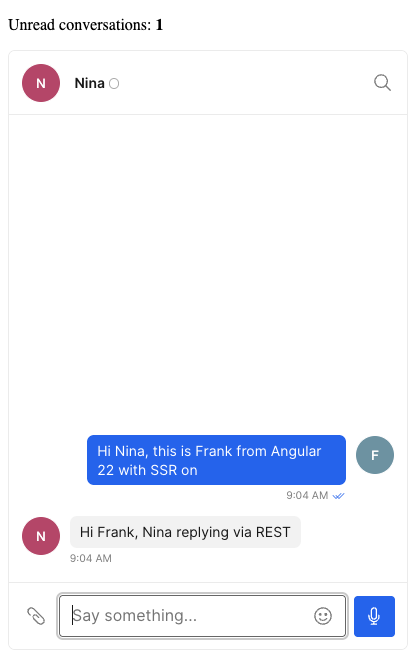
The <t-chatbox> tag is in the template before the import finishes, so the browser doesn’t know it yet. The [app-id], [user-id] and [conversation-id] bindings still worked once the import finished. In the test projects we tried, the sample users didn’t exist, so the code creates two, Frank and Nina.
Before launch, have your server sign a token for each user, pass it to the session with setToken, and turn on authentication in your dashboard settings, as the TalkJS authentication docs describe.
Which Angular chat packages say they support Angular 22 and zoneless?
In October 2026, Stream’s README is the only source in this table that lists Angular 22 as supported, and it says zoneless mode isn’t supported yet. For TalkJS, the row shows what we ran.
| Package | What it is | Angular versions stated | Zoneless | Messaging backend | Source |
|---|---|---|---|---|---|
TalkJS @talkjs/ 0.3.12 and @talkjs/ 1.12.1 | Chat UI as web components, plus a data API | None: no Angular peer dependency. We ran it on 22.2.3 | Yes in our test, with SSR | Included | Our test; npm |
Stream stream-chat- 7.2.0 | Angular components for Stream Chat | “Angular 17–22”. On 22, install ngx-float-ui@21 with --legacy- | “Zoneless mode isn’t yet supported” | Included: Stream Chat, “a service for building chat applications” | Its README, Oct 24, 2026 |
CometChat @cometchat/ 5.2.2 | UI kit on CometChat’s JavaScript SDK | npm peer range >=17.0.0 <22.0.0 | Not listed | Included: CometChat | npm |
| Kendo UI for Angular Chat | Chat UI component | Not listed | Not listed | You connect your own: “Integrate with AI services and other backend systems” | Product page |
| DevExtreme Chat (DevExpress) | Chat UI component | Not listed | Not listed | You connect your own: “sending the message to the server for storage” | Getting started guide |
| Syncfusion Angular Chat UI | Chat UI component | Not listed | Not listed | You connect your own: “compatible with SignalR and other back ends” | Product page |
| Ignite UI for Angular Chat (Infragistics) | Chat UI component | Not listed | Not listed | You connect your own: “plug the Chat into your own data source” | Product page |
A UI-only component still needs a server behind it that stores messages, delivers them to the other user, and sends push notifications. With TalkJS, our servers store and deliver the messages and send email, SMS, and push notifications to users who are offline.
If you build that server yourself, Angular adds one rule of its own. Server-rendered apps “cannot make use of browser-specific global objects like window, document, navigator, or location,” as the Angular SSR guide puts it, so your socket client has to open in afterNextRender too. The rest is the usual list: a real-time server, a way to catch users up on messages they missed, push sent from your own server, and moderation.

We were able to offload all messaging to TalkJS — hugely simplifying our development of an otherwise complex stack.
Ready-made chat UI you can customize
In Angular, each pre-built chat UI is one tag in a template: <t-chatbox> for a single conversation, <t-inbox> for a messaging page, and <t-conversation-list> for the list on its own. They’re the TalkJS web components, so you style them with properties, CSS, or a custom theme. For a chat popup, open a chatbox from a button of your own.
The TalkJS Inbox shows the chat history on the left, selected conversation on the right. It’s designed to act as the messaging center of your app, usually living on its own page.
The TalkJS Chatbox is the right half of the Inbox UI mode. It takes up less space and is designed to be embedded in your app near an order confirmation, a booking, or user profile.
The user’s conversations in one list. Put a Chatbox next to it to open the one they pick, or use the Inbox, which combines the two.