AI coding agents
Add in-app chat with your AI coding agent
We wrote an agent skill: instructions your coding agent follows to add TalkJS chat to the app you already have. Give it to Claude Code, Cursor or Codex with one prompt. The agent picks the guide for your framework, sets up a free test project without you signing up, and builds a working chat with a ready-made chat UI. When we tried it in Claude Code, our React marketplace app had buyer-seller chat running in under seven minutes.
Paste this prompt into your coding agent:
Add TalkJS chat to my app: talkjs.com/SKILL.mdHow do I add TalkJS chat with my coding agent?
Paste the prompt above into your agent. If you'd rather keep the skill around, install the TalkJS skills. The command asks which agents you use and sets the skill up for each one:
npx skills add talkjs/skillsIn the same prompt, say who should talk to whom and where the chat goes, for example "Add a chat between buyers and sellers to my Next.js marketplace". Here's what the agent does next:
- It reads your project: the framework, the users and the backend. It adds chat to the app you have, and if the chat could go in more than one place, it suggests one and asks you first.
- It creates a free test project if you don't have a TalkJS project yet, and gives you a link to claim it later. You don't sign up for anything. The skill tells the agent to keep the project's secret token out of your frontend code and your repo.
- It builds a first version with test users and conversations, following the TalkJS guide for your framework.
- It tests that version. It sends a message as one user, replies as another and reloads the page to check the messages are still there. If it can't run those checks, it tells you the chat is unverified instead of calling it done.
- It asks before it touches security: "The chat works, but it is not secured for real users yet. Shall I add TalkJS authentication to your backend next?"
What happened when we tried it in Claude Code?
We opened Claude Code in a small React marketplace app: a listing page with a "Message the seller" button that didn't do anything yet. We gave it the prompt above and nothing else.
It used the TalkJS React components: a chatbox on the listing page and an inbox on a new Messages page, with three test users (two buyers and a seller) and a menu to sign in as each one. It created a test project and gave us the claim link. The only TalkJS project detail it put in the code is the project's public app ID: we searched the code and the build for the secret token and didn't find it. The agent reported that it sent messages both ways and reloaded the page to check they stayed.
Then we built the app and used it ourselves: as a buyer on a second listing, and as the seller replying from the new inbox. This is the buyer's side:
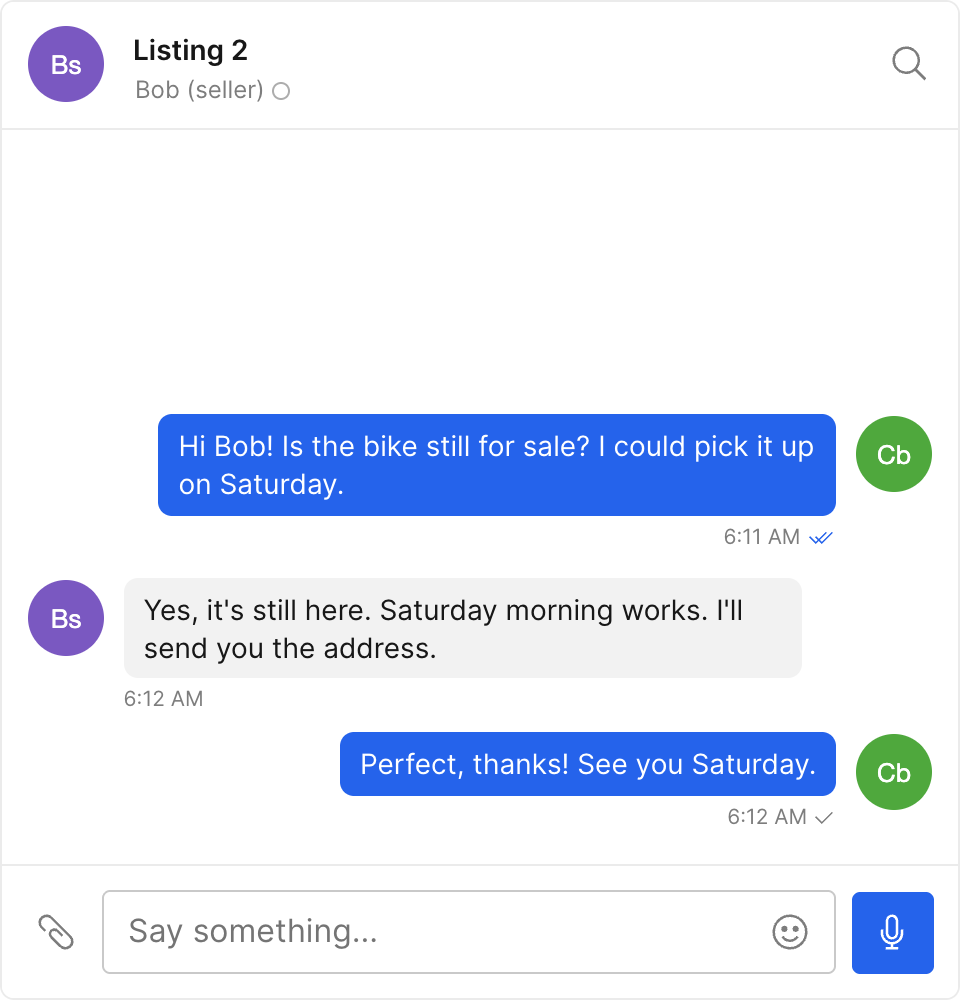
It changed 9 files. Three of the new ones exist only because our sample app had no entry files yet. The chat itself is the rest:
| File | What the agent did |
|---|---|
src/ (new) | Test project app ID, the three test users and the TalkJS session |
src/ | The chatbox between the buyer and the seller, one conversation per listing and buyer |
src/ (new) | The inbox with the signed-in user's conversations |
src/ | The Messages link and route, and the menu to sign in as a test user |
package.json, package-lock.json | The TalkJS packages |
index.html, src/, vite.config.js (new) | Entry files our sample app was missing |
It ended by asking whether to add authentication next. It also left two things undone: it didn't style the page around the chat, and in the seller's inbox every chat about the same listing had the same title.
Why not let the agent write the chat itself?
When we asked coding agents to add chat to sample apps without naming an SDK, most wrote their own. One wrote a WebSocket server that kept messages in memory and had no login checks. Another kept messages in a JSON file and had the browser ask for new ones every few seconds. A third used the browser's own storage, so the chat would only work between tabs of one browser. Great if your buyers and sellers share a laptop. None of the agents ran their code.
That's fine for a demo. A chat your users depend on needs four more things, and with a homemade chat, each one is yours to build and keep running:
- Notifications. Someone who's offline needs an email, SMS or push notification to see the message. TalkJS sends chat notifications on every paid plan, and people can reply to a chat from their email.
- Moderation. If your app is on the App Store, Apple's guideline 1.2 requires apps with user-generated content to filter objectionable material, let people report it and block abusive users. TalkJS has forbidden word lists, hides email addresses, phone numbers and links, lets users report a message, and lets you ban users through the REST API. See moderation in TalkJS.
- Message history. TalkJS stores every message, with no limit on how long it keeps them on any plan.
- The chat UI. TalkJS gives you inboxes, chatboxes and popups with group chat, file sharing and voice messages, styled with themes to match your app.
With TalkJS, all four come built in. Your agent writes only the part that's specific to your app: who talks to whom, and where the chat goes.
Which frameworks does the TalkJS skill support?
The skill covers React and Next.js, Vue, Svelte, Angular and plain JavaScript on the web, and React Native (with or without Expo) and Flutter on mobile. It also covers your backend: TalkJS authentication and the REST API. The agent picks the right guide for your project, so point it at the skill rather than at one guide.
For anything the skill doesn't cover, your agent can read the TalkJS docs directly. Every docs page has a markdown version: add .md to its address, as in talkjs.com/docs/index.md. The llms.txt file lists the main pages for agents.
Do I need a TalkJS account to start?
No. The test project your agent creates works without one. It's made for building and testing, so file uploads are capped at 1 MB, and the features that send data out of TalkJS, such as email, SMS and push notifications and webhooks, are off.
When you want to keep it, open the claim link and create a TalkJS account or log in. The project moves to your account on the Basic plan, in test mode, and the 1 MB cap goes away. The Basic plan includes email, SMS and push notifications. Billing only starts if you choose to go live, and TalkJS is priced per monthly active user.
Before real users get access, claim the project, have your agent add TalkJS authentication to your backend, and turn on identity verification in the TalkJS dashboard.
Building an AI assistant instead?
This page is about chat between the people who use your app. If you also want an AI bot in those conversations, TalkJS lets a bot take part as one more participant. See AI chatbots with TalkJS.
FAQs
Yes. It follows the open Agent Skills standard, and TalkJS supports it in Codex, Cursor, Claude Code, GitHub Copilot and other agents that use that standard.
Yes. The skill tells the agent to reuse the TalkJS project your app already has, so it won't create a new one. A web app on one of the Classic SDKs stays on it unless you ask the agent to migrate.